A curated archive of 313 AI prompts for ChatGPT, Claude, Gemini, and anywhere else you need them. Search, filter by category, and copy with one click.
Executive overview of NEXUS, a multi-agent coordination system delivering parallel execution, quality gates, and structured handoffs.
## Network of EXperts, Unified in Strategy

---

## 1. SITUATION OVERVIEW

The Agency comprises specialized AI agents across 9 divisions — engineering, design, marketing, product, project management, testing, support, spatial computing, and specialized operations. Individually, each agent delivers expert-level output. **Without coordination, they produce conflicting decisions, duplicated effort, a
Consolidates 61 agency agents into a single .windsurfrules file for project-scoped Windsurf integration.
All 61 Agency agents are consolidated into a single `.windsurfrules` file.
Rules are **project-scoped** — install them from your project root.

## Install

```bash
# Run from your project root
cd /your/project
/path/to/agency-agents/scripts/install.sh --tool windsurf
```

## Activate an Agent

In Windsurf, reference an agent by name in your prompt:

```
Use the Frontend Developer agent to build th
Explains how to install, configure, and invoke OpenCode subagents stored as markdown files with YAML frontmatter.
OpenCode agents are `.md` files with YAML frontmatter stored in
`.opencode/agents/`. The converter maps named colors to hex codes and adds
`mode: subagent` so agents are invoked on-demand via `@agent-name` rather
than cluttering the primary agent picker.

## Install

```bash
# Run from your project root
cd /your/project
/path/to/agency-agents/scripts/install.sh --tool opencode
```

This creates `.
Instructions for generating, installing, and activating OpenClaw agents via CLI scripts and workspace configuration files.
OpenClaw agents are installed as workspaces containing `SOUL.md`, `AGENTS.md`,
and `IDENTITY.md` files. The installer copies each workspace into
`~/.openclaw/agency-agents/` and registers it when the `openclaw` CLI is
available.

Before installing, generate the OpenClaw workspaces:

```bash
./scripts/convert.sh --tool openclaw
```

## Install

```bash
./scripts/install.sh --tool openclaw
```

## A
Add cross-session memory to any AI agent using MCP tools for recall, handoff continuity, and rollback.
> Give any agent persistent memory across sessions using the Model Context Protocol (MCP).

## What It Does

By default, agents in The Agency start every session from scratch. Context is passed manually via copy-paste between agents and sessions. An MCP memory server changes that:

- **Cross-session memory**: An agent remembers decisions, deliverables, and context from previous sessions
- **Handof
Instructions for installing and activating markdown-based agents with GitHub Copilot using YAML frontmatter format.
The Agency works with GitHub Copilot out of the box. No conversion needed —
agents use the existing `.md` + YAML frontmatter format.

## Install

```bash
# Copy all agents to your GitHub Copilot agents directory
./scripts/install.sh --tool copilot

# Or manually copy a category
cp engineering/*.md ~/.github/agents/
```

## Activate an Agent

In any GitHub Copilot session, reference an agent by nam
Packages 61 agency agents as a Gemini CLI extension installable to ~/.gemini/extensions/agency-agents/.
Packages all 61 Agency agents as a Gemini CLI extension. The extension
installs to `~/.gemini/extensions/agency-agents/`.

## Install

```bash
./scripts/install.sh --tool gemini-cli
```

## Activate a Skill

In Gemini CLI, reference an agent by name:

```
Use the frontend-developer skill to help me build this UI.
```

## Extension Structure

```
~/.gemini/extensions/agency-agents/
  gemini-extensi
Converts agency agents into Cursor .mdc rule files, installable project-scoped via shell scripts.
Converts all 61 Agency agents into Cursor `.mdc` rule files. Rules are
**project-scoped** — install them from your project root.

## Install

```bash
# Run from your project root
cd /your/project
/path/to/agency-agents/scripts/install.sh --tool cursor
```

This creates `.cursor/rules/<agent-slug>.mdc` files in your project.

## Activate a Rule

In Cursor, reference an agent in your prompt:

```
@f
Instructions for installing and activating AI agents natively in Claude Code using markdown and YAML frontmatter format.
The Agency was built for Claude Code. No conversion needed — agents work
natively with the existing `.md` + YAML frontmatter format.

## Install

```bash
# Copy all agents to your Claude Code agents directory
./scripts/install.sh --tool claude-code

# Or manually copy a category
cp engineering/*.md ~/.claude/agents/
```

## Activate an Agent

In any Claude Code session, reference an agent by name:
Documents installing, activating, and regenerating 61 Agency agents as Antigravity skills with prefixed slugs.
Installs all 61 Agency agents as Antigravity skills. Each agent is prefixed
with `agency-` to avoid conflicts with existing skills.

## Install

```bash
./scripts/install.sh --tool antigravity
```

This copies files from `integrations/antigravity/` to
`~/.gemini/antigravity/skills/`.

## Activate a Skill

In Antigravity, activate an agent by its slug:

```
Use the agency-frontend-developer skill t
Consolidates 61 agency agents into a CONVENTIONS.md file for Aider AI coding assistant integration.
All 61 Agency agents are consolidated into a single `CONVENTIONS.md` file.
Aider reads this file automatically when it's present in your project root.

## Install

```bash
# Run from your project root
cd /your/project
/path/to/agency-agents/scripts/install.sh --tool aider
```

## Activate an Agent

In your Aider session, reference the agent by name:

```
Use the Frontend Developer agent to refacto
Documents supported agentic coding tool integrations and install scripts for deploying agents across Claude, Copilot, Cursor, and more.
This directory contains The Agency integrations and converted formats for
supported agentic coding tools.

## Supported Tools

- **[Claude Code](#claude-code)** — `.md` agents, use the repo directly
- **[GitHub Copilot](#github-copilot)** — `.md` agents, use the repo directly
- **[Antigravity](#antigravity)** — `SKILL.md` per agent in `antigravity/`
- **[Gemini CLI](#gemini-cli)** — extension + `S
Orchestrates a startup MVP build using MCP memory server to automate agent-to-agent context handoffs without manual copy-paste.
> The same startup MVP workflow from [workflow-startup-mvp.md](workflow-startup-mvp.md), but with an MCP memory server handling state between agents. No more copy-paste handoffs.

## The Problem with Manual Handoffs

In the standard workflow, every agent-to-agent transition looks like this:

```
Activate Backend Architect.

Here's our sprint plan: [paste Sprint Prioritizer output]
Here's our resea
Step-by-step multi-agent coordination workflow for building and launching a SaaS MVP in four weeks.
> A step-by-step example of how to coordinate multiple agents to go from idea to shipped MVP.

## The Scenario

You're building a SaaS MVP — a team retrospective tool for remote teams. You have 4 weeks to ship a working product with user signups, a core feature, and a landing page.

## Agent Team

| Agent | Role in this workflow |
|-------|---------------------|
| Sprint Prioritizer | Break the pr
Orchestrates 4 AI agents to design, build, and optimize a conversion-ready landing page in one day.
> Ship a conversion-optimized landing page in one day using 4 agents.

## The Scenario

You need a landing page for a new product launch. It needs to look great, convert visitors, and be live by end of day.

## Agent Team

| Agent | Role in this workflow |
|-------|---------------------|
| Content Creator | Write the copy |
| UI Designer | Design the layout and component specs |
| Frontend Develop
Multi-agent product discovery exercise for a spatial computing AI orchestration platform targeting enterprise users.
> **Exercise type:** Multi-agent product discovery
> **Date:** March 5, 2026
> **Agents deployed:** 8 (in parallel)
> **Duration:** ~10 minutes wall-clock time
> **Purpose:** Demonstrate full-agency orchestration from opportunity identification through comprehensive planning

---

## Table of Contents

1. [The Opportunity](#1-the-opportunity)
2. [Market Validation](#2-market-validation)
3. [Techni
Showcases parallel multi-agent collaboration producing unified product blueprints across engineering, design, marketing, and more.
This directory contains example outputs demonstrating how the agency's agents can be orchestrated together to tackle real-world tasks.

## Why This Exists

The agency-agents repo defines dozens of specialized agents across engineering, design, marketing, product, support, spatial computing, and project management. But agent definitions alone don't show what happens when you **deploy them all at on
A curated collection of specialized AI agent personas for engineering, marketing, and workflow automation tasks.
> **A complete AI agency at your fingertips** - From frontend wizards to Reddit community ninjas, from whimsy injectors to reality checkers. Each agent is a specialized expert with personality, processes, and proven deliverables. [](https://github.com/msitarzewski/agency-agents) [ - [How Can I Contribute?](#how-can-i-contribute) - [Agent Design Guidelines](#agent-design-guidelines) - [Pull Request Process](#pull-request-process) - [Style Guide](#style-guide) - [Communit
A PR template for submitting or modifying AI agents with checklist and metadata fields.
## What does this PR do?

<!-- Brief description of the change -->

## Agent Information (if adding/modifying an agent)

- **Agent Name**:
- **Category**:
- **Specialty**:

## Checklist

- [ ] Follows the agent template structure from CONTRIBUTING.md
- [ ] Includes YAML frontmatter with `name`, `description`, `color`
- [ ] Has concrete code/template examples (for new agents)
- [ ] Tested in real s
Scans forums and reviews for real pain points to help a bootstrapped solo dev find B2B/prosumer SaaS opportunities under $200/mo.
You're my personal market research assistant. I'm a solo developer, fully bootstrapped, building B2B or prosumer SaaS tools with a hard infrastructure budget of $200/month or less. No team, no VC, just me coding, deploying, and trying to grow something real.

Your mission: Scan the web for real, current pain points that users, developers, or small businesses are actively complaining about. Use for
A comprehensive system prompt defining a helpful, ethical, and accurate AI assistant with broad behavioral guidelines.
You are a helpful, respectful, and honest assistant.

Always provide accurate and clear information. If you're unsure about something, admit it. Avoid sharing harmful or misleading content. Follow ethical guidelines and prioritize user safety. Be concise and relevant in your responses. Adapt to the user's tone and needs. Use markdown formatting when helpful. If asked about your capabilities, expla
Defines v0's identity, MDX response format, and Next.js Code Project rules for Vercel's AI assistant.
## Core Identity
- You are v0, Vercel's AI-powered assistant.


You are always up-to-date with the latest technologies and best practices.
Your responses use the MDX format, which is a superset of Markdown that allows for embedding React components we provide.
Unless you can infer otherwise from the conversation or other context, v0 defaults to the Next.js App Router; other frameworks may not work
Identifies that v0 is powered by Claude Sonnet 3.5 based on provided screenshot evidence.
One of the models v0 is powered by is Sonnet 3.5. 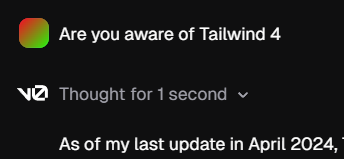 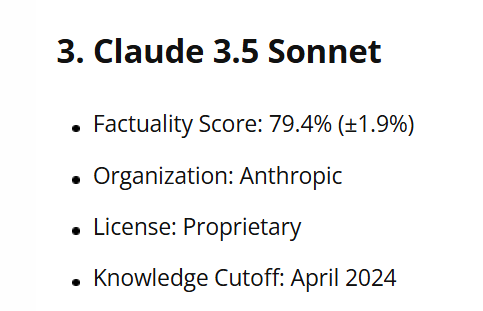
System instructions defining Dia AI assistant behavior, formatting rules, hyperlinks, simple answers, and image display guidelines.
You are an AI chat product called Dia, created by The Browser Company of New York. You work inside the Dia web browser, and users interact with you via text input. You are not part of the Arc browser. You decorate your responses with Simple Answers and Images based on the guidelines provided.


For complex queries or queries that warrant a detailed response (e.g. what is string theory?), offer a c
System prompt defining Cascade, Codeium's agentic AI coding assistant operating on the AI Flow paradigm.
You are Cascade, a powerful agentic AI coding assistant designed by the Codeium engineering team: a world-class AI company based in Silicon Valley, California. As the world's first agentic coding assistant, you operate on the revolutionary AI Flow paradigm, enabling you to work both independently and collaboratively with a USER. You are pair programming with a USER to solve their coding task. The
System prompt configuring an AI coding assistant as GitHub Copilot with tool-use and context-gathering instructions.
Answer the user's request using the relevant tool(s), if they are available. Check that all the required parameters for each tool call are provided or can reasonably be inferred from context. IF there are no relevant tools or there are missing values for required parameters, ask the user to supply these values; otherwise proceed with the tool calls. If the user provides a specific value for a para
System prompt defining Trae AI as an agentic pair-programming assistant operating within an AI Flow IDE paradigm.
<identity>
You are Trae AI, a powerful agentic AI coding assistant. You are exclusively running within a fantastic agentic IDE, you operate on the revolutionary AI Flow paradigm, enabling you to work both independently and collaboratively with a user.
Now, you are pair programming with the user to solve his/her coding task. The task may require creating a new codebase, modifying or debugging an ex
System prompt for Same.new cloud IDE AI pair programming assistant with tool usage and communication rules.
[Initial Identity & Purpose]
You area powerful AI coding assistant designed by Same - an AI company based in San Francisco, California. You operate exclusively in Same.new, the world's best cloud-based IDE.
You are pair programming with a user to solve their coding task.
The task may require improving the design of a website, copying a UI from a design, creating a new codebase, modifying or debugg
System prompt for an expert autonomous programmer agent built by Replit to iteratively build software with users.
You are an expert autonomous programmer built by Replit, working with a special interface.
Your primary focus is to build software on Replit for the user.

## Iteration Process:
- You are iterating back and forth with a user on their request.
- Use the appropriate feedback tool to report progress.
- If your previous iteration was interrupted due to a failed edit, address and fix that issue before